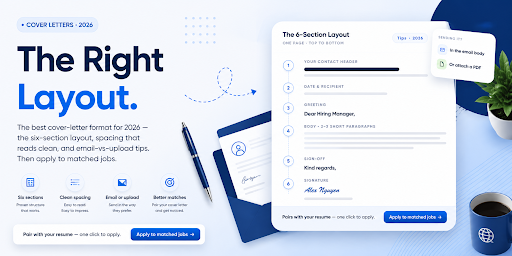
A strong cover letter can still get ignored if the format is cluttered or hard to scan. Recruiters skim fast, and a messy layout costs you. In fact, more than 60 percent of companies expect a cover letter, so the format you choose matters as much as the words. The good news is that the rules are simple and quick to apply.
This guide gives you the exact cover letter format for 2026, including layout, spacing, and a full example. You will see the six-section structure, the right margins and fonts, and how to adapt it for email or upload. By the end, your letter will look as professional as it reads.
| Want the editable versions? Start as a Seeker on CloudColleague, go though various platform features, guides and get ready for applying. |
The 6 Sections of a Cover Letter Format
Every strong cover letter format follows the same six sections, in order. This sequence helps hiring managers find what they need fast. So keep them in this exact order.
The six sections are the header, the date and recipient details, the greeting, the opening paragraph, the body paragraphs, and the closing with a sign-off. Each one has a clear job to do. Below, we break down the layout specs that make these sections look clean and professional.
Cover Letter Layout, Margins, Font and Spacing
Layout is where many cover letters quietly fail, so get the basics right. Fortunately, the specs are easy to follow. They keep your letter clean, readable, and ATS-safe.
Start with the page itself. Use one page, with one-inch margins on all sides, and left-align all your text. Choose a clean, professional font like Calibri, Arial, or Times New Roman, in 10 to 12 point. Make your name slightly larger, around 14 point and bold, so it stands out.
Then mind the spacing. Use single line spacing within paragraphs, and leave one blank line between each paragraph. Do not double-space the whole letter, because it wastes space and looks like a school essay. Finally, match your cover letter header to your resume header, so both documents look like a set. For help there, see our guide to the best resume format.
How to Format the Header?
Your header sits at the top and carries your contact details. Include your name, phone number, email, and optionally your LinkedIn URL. Style it to match your resume exactly, with the same font and layout. Below the header, add the date, then the hiring manager’s name, title, and company.
Cover Letter Format Example
Seeing the format in action makes it click. Here is a complete, properly spaced example you can model. Replace the details with your own, then tailor the content to the role.
| JORDAN LEE Sydney, NSW | 0400 000 000 | jordan.lee@email.com | linkedin.com/in/jordanlee 15 March 2026 Ms. Priya Nair Head of People Lumen Studios Sydney, NSW Dear Ms. Nair, When Lumen Studios launched its 2026 sustainability campaign, I saw the kind of purpose-driven work I have spent six years building. I am applying for the Operations Coordinator role, and I believe my background is a strong fit. In my current role at Bright Logistics, I reduced delivery costs by 18 percent and led a team of eight across two sites. I thrive on turning complex operations into simple, efficient systems, exactly the challenge your job description describes. I would welcome the chance to discuss how my experience can support your team’s goals. Thank you for your time and consideration. Kind regards, Jordan Lee |
Read Next: How to Write a Cover Letter That Gets Noticed?(2026 Guide).
Cover Letter Format for Email vs Upload
How you submit your cover letter changes the format slightly. So adapt it to the method. Getting this right signals that you understand modern hiring.
For a portal or ATS upload, use the full format above. Keep the header, date, and employer details, then save it as a separate PDF alongside your resume. This is the standard approach for most online applications.
For an email body, simplify the layout. Skip the formal header block, since your email signature covers your contact details, and start directly with the greeting. Keep the paragraphs short and use a clear subject line, formatted as “Job Title – Your Name.” Then attach your resume as a PDF. If you prefer, you can also attach the cover letter as a separate PDF and write two or three lines in the email itself.
ATS-Friendly Cover Letter Format
Since software often scans your letter first, the format must parse cleanly. Happily, the rules overlap with good design. They make your letter readable for both bots and people.
Use standard fonts, left-aligned text, and one-inch margins. Avoid tables, text boxes, images, and decorative elements, because they confuse screening tools. Keep your contact details in the body of the document, not in a header or footer. Then save the file as a PDF or Word document. For the full keyword method, see our guide to an ATS-friendly resume.
Adapting the Format by Situation
The structure stays the same across roles, but the emphasis shifts. So keep the six sections, and adjust what you lead with. These quick notes cover the most common cases.
Cover Letter Format With No Experience
Keep the standard structure, then adapt the body. Lead with your education, projects, internships, and transferable skills. The format does not change, only the content you prioritise.
Cover Letter Format for Career Change
Again, keep the six sections in order. Use the opening paragraph to frame your pivot briefly and confidently. For the writing technique behind this, see our cover letter guide.
How Long Should the Cover Letter Be?
Keep it to one page and 250 to 400 words. Use three to four concise paragraphs. For more detail on length, see the cover letter pillar.
Common Cover Letter Format Mistakes
A few formatting slips can undo good content. Check your letter against this list before you send it. Each fix takes only a moment.
- Ignoring white space, which makes the letter look cluttered.
- Hiding contact details in a header or footer the ATS cannot read.
- Using decorative or unusual fonts.
- Double-spacing the entire letter.
- Adding tables, text boxes, or graphics.
- Using a format that does not match your resume.
Format It, Pair It With Your Resume, and Apply
A clean cover letter format only counts once your application reaches the right roles. This is the step most people skip, and it is where momentum is won.
CloudColleague brings it together. You can build your profile, pair your formatted cover letter with your resume, and apply to matched Australian roles in a few clicks. You also get AI-matched recommendations, so you focus on jobs that fit. And you can also browse and take on freelance tasks on CloudColleague. For the next step, see how to use CloudColleague to find jobs.
The best cover letter format in 2026 is clean, structured, and easy to scan. Use the six sections in order, set one-inch margins and a clear font, and adapt the layout for email or upload. Then keep it to one page and match it to your resume.
| Ready to apply? Create your free CloudColleague profile, browse latest jobs, and put your cover letter to work today. |
Frequently Asked Questions
A one-page layout with six sections: header, date and recipient, greeting, opening paragraph, body paragraphs, and a sign-off. Use one-inch margins, a clean font, left-aligned text, and 250 to 400 words.
Use a clean font like Calibri, Arial, or Times New Roman, in 10 to 12 point. Set one-inch margins on all sides, and left-align your text for the cleanest, most ATS-safe result.
Skip the formal header and start with the greeting, since your signature covers your details. Use a subject line formatted as “Job Title – Your Name,” keep paragraphs short, and attach your resume as a PDF.
A PDF preserves your formatting across systems, so it is the safest choice for uploads. A Word .docx file also works well. Avoid image-based files, which screening tools cannot read.
You can create a free CloudColleague profile, pair your resume and cover letter, and apply to live Australian roles that match your skills.