Picture two professionals. Both are looking for work this week. One is on three job boards, applying to the same listings as hundreds of other candidates, waiting for automated filters to decide whether a human ever sees their resume. The other is on CloudColleague. They applied for a full-time role this morning, submitted a proposal for a short-term task this afternoon, and updated their service listing to attract direct client enquiries. By Friday, they will have heard back on two of the three.
The difference is not luck. It is the platform.
CloudColleague was built for the version of work that actually exists in 2026. Not just full-time jobs. Not just freelance gigs. Jobs, short-term tasks, and packaged professional services, all in one place, with a small commission on task work and affordable fees for businesses posting roles. It is a marketplace built around how professionals and businesses actually want to work together. This guide walks you through every step of using it: registration, profile setup, applying for jobs and tasks, delivering work, and building the kind of on-platform reputation that makes opportunities find you rather than the other way around.
What Is CloudColleague and How Does It Work?
CloudColleague is a global marketplace that connects businesses with professionals for jobs, tasks, and services. It operates as a digital talent platform where businesses post work and professionals apply, propose, or list the services they offer. The platform handles the full engagement cycle: discovery, communication, work delivery, and secure payment.
What makes CloudColleague structurally different from a traditional job board is the scope of work it covers. A job board like SEEK or Indeed lists employment roles only. CloudColleague, however, lists employment roles, short-term tasks, and packaged professional services. Consequently, a professional can find a permanent full-time position, pick up a one-off project, or sell a defined service to businesses, all from the same account.
The platform is designed for both sides of the professional market simultaneously. Businesses pay nothing to get started. Furthermore, the first 25 employers receive completely free access for one entire year, making CloudColleague accessible to organisations of every size. Professionals pay only a 7% commission on tasks, meaning almost all payments go directly to them.
The verification process adds a layer of credibility to both sides of the marketplace. Verified professionals carry a status marker on their profile signalling that their identity and credentials have been checked. This benefits both parties: businesses hire with greater confidence, and verified professionals appear more credibly in search results and application pools.
The secure payment system protects both businesses and professionals throughout every engagement. The platform processes payment rather than passing it directly between parties. As a result, professionals receive protection against non-payment and businesses receive protection against non-delivery.This structural trust mechanism is particularly important for first-time users on both sides.
Difference Between a Job, a Task, and a Service on CloudColleague
Understanding the three types of opportunities on CloudColleague is the foundation of using the platform effectively. Each type serves a different purpose, suits a different professional situation, and follows a slightly different process.
| Type | Duration | Who Initiates | Commission | Best For |
| Job | Ongoing or fixed term | Business posts, professional applies | Standard | Professionals seeking ongoing employment |
| Task | Short-term, one-off | Business posts, professional applies | 7% commission | Flexible or project-based work at any career stage |
| Service | Defined by professional | Professional lists, business purchases | Standard | Packaging expertise for direct client purchase |
Jobs on CloudColleague are traditional employment listings for ongoing or fixed-term roles. A business posts a job describing the position, requirements, compensation, and engagement terms. Professionals browse and apply in the same way they would on any job board. Additionally, the business profile and review history are visible alongside every listing.
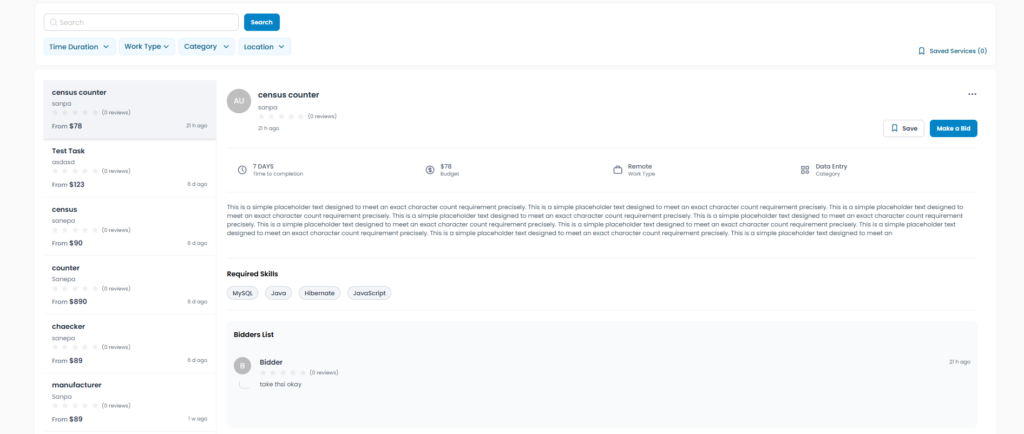
Tasks are short-term or one-off pieces of work with a defined scope, timeline, and budget. A business might post a task to have a report written, a website updated, accounts reconciled, or data cleaned and formatted. For professionals building experience, supplementing income, or exploring a new field, tasks are consequently one of the most valuable features on the platform.
Services are professional offerings that the professional creates and lists directly. Instead of waiting for a business to post work, you define what you offer, at what price, and within what timeframe. Businesses browsing the platform can then purchase your service directly. Services work best for professionals with a defined, repeatable offering that can be clearly scoped and priced in advance.
For most first-time users, the recommended starting point is jobs for ongoing employment and tasks for building early experience. Services become more relevant once a clear, packageable offering exists.
How to Register on CloudColleague?
Registration on CloudColleague takes a few minutes and is the first step before you can apply for any job, task, or service on the platform. Completing registration fully before you start browsing is important because your profile is part of your application, and an incomplete profile reduces your credibility with businesses before they have read a single word of your submission.
Step 1. Go to cloudcolleague.com and Click Sign Up
Open your browser and navigate to cloudcolleague.com. Click the Sign Up button in the top right corner of the homepage. You will be prompted to enter your name, email address, and a password to create your account. Use your professional email address, the same one you use for job applications, rather than a personal or informal address. The email address you register with is how businesses and the platform will contact you.
Step 2. Choose Your Account Type
CloudColleague allows you to register as a professional, as a business, or as both. If you are looking for work, select a professional; If you are looking to hire, select business. If you want to do both, which is useful for freelancers who also hire subcontractors, consultants who sometimes need specialist support, or small business owners who are also available for hire in their area of expertise, select both.
Choosing both does not create two separate accounts. It gives you access to both the professional-facing features and the business-facing features from a single login, which simplifies account management significantly.
Step 3. Verify Your Email Address
After completing the registration form, CloudColleague will send a verification email to the address you provided. Open the email and click the verification link to activate your account. If the email does not arrive within a few minutes, check your spam or junk folder before requesting a resend. Email verification is required before you can access the full platform features.
Step 4. Complete Your Basic Profile Information
Once your email is verified, you will be prompted to complete your basic profile information. This includes your location, suburb and state for Australian users, your work rights status, your availability, and your preferred work types. Complete these fields accurately and in full. Your location and availability settings determine which opportunities surface for you in search results and job alert notifications.
Work rights status is a required field on CloudColleague for Australian users, consistent with Fair Work Australia requirements for employers verifying the right to work. The options are Australian citizen, Australian permanent resident, New Zealand citizen with work rights in Australia, and various temporary visa categories. Provide accurate information. Businesses on the platform are required to verify work rights before engaging professionals for ongoing employment, and incorrect information creates complications that waste both parties’ time.
Registration tip: Take 10 minutes to complete every field during registration rather than skipping sections and returning later. Businesses browsing profiles filter out incomplete accounts before reading applications. Starting fully completed puts you ahead of the candidates who left gaps.
Know about: How to apply for jobs on CloudColleague, and start applying.
Set Up Your CloudColleague Profile to Get Noticed
Your profile on CloudColleague is not a support document for your applications. It is an active part of every application you submit and a standalone presence that businesses find when they browse the platform for professionals. The quality of your profile directly affects how many opportunities come to you, not just how credible your outbound applications are.
Write a CloudColleague Professional Profile That Attracts Opportunities
Your profile headline is the first line a business reads after your name. Most professionals write their current job title here. However, that is a missed opportunity. A specific, searchable skill phrase performs significantly better in platform search results.
| Weak Headline | Strong Headline | |
| Example 1 | Marketing Manager | Digital Marketing Specialist with SEO, Content Strategy, and Paid Social Experience – Available for Jobs and Projects |
| Example 2 | Accountant | CPA-Qualified Accountant Specialising in Small Business Tax, Bookkeeping, and BAS Lodgement – Melbourne Based |
| Example 3 | Developer | Full Stack Web Developer (React, Node.js, AWS) with E-commerce and SaaS Project Experience – Open to Contract and Permanent Roles |
Your professional description tells businesses who you are, what you do, and what you are looking for. Write it in the first person and keep it specific. Two to four focused paragraphs is the right length for most professionals.
Weak: “Experienced professional with a background in marketing. Strong communication skills and a track record of delivering results.”
Strong: “I am a digital marketing specialist with six years of experience managing content strategy, SEO, and paid social campaigns for Australian B2B and e-commerce clients. Currently, I lead a team of three and consistently deliver 40 to 60 percent year-on-year organic traffic increases. I am exploring senior in-house marketing roles in Melbourne and project-based SEO work through CloudColleague.”
Your skills section is a keyword matching tool as much as a professional declaration. Consequently, list the specific skills that appear most frequently in the job and task listings you are targeting. Eight to twelve well-chosen skills outperform a list of thirty generic ones.
How to Upload Supporting Documents and Portfolio Items?
Upload your resume to your CloudColleague profile as a PDF. This document is used by businesses when reviewing your job applications and can be downloaded directly from your profile. Keep it current. An outdated resume on your platform profile creates a contradiction that undermines your credibility with businesses who compare your resume to your profile description.
Portfolio items are among the most powerful profile elements available on CloudColleague, particularly for candidates without an extensive formal employment history. A portfolio item describes a specific project or piece of work you have completed: what the scope was, what tools or skills you applied, what the outcome was, and where possible, evidence of the result. A developer’s GitHub repository, a writer’s published articles, a designer’s project case studies, a marketer’s campaign results, and a completed CloudColleague task all qualify as portfolio items worth adding.
Certifications and qualifications uploaded to your profile add formal credibility alongside your experience. Recognised third parties back your claimed skills when you hold a TAFE certificate, Google Analytics certification, project management qualification, or industry-specific licence. Businesses read these credentials as verified proof of capability.
How to Get Verified on CloudColleague?
Verification on CloudColleague involves confirming your identity and, depending on the verification level you pursue, your professional credentials and employment history. Verified professionals display a visible status marker on their profile. That marker signals to businesses that basic due diligence has been completed.
The practical benefit of verification is visibility and credibility. In a pool of applicants for a job or task listing, a verified professional profile is more compelling to a business than an unverified one, all else being equal. For professionals applying for roles that involve access to sensitive data, financial responsibility, or ongoing client relationships, verification status can be a meaningful differentiating factor.
Complete the verification process as early as possible after registration. The steps involved typically include identity document upload and, for professional credential verification, submission of relevant qualification documents. The process takes a short period to complete and the credibility benefit is permanent once granted.
How to Search for Jobs on CloudColleague?
CloudColleague’s search and filtering functionality is designed to surface relevant opportunities efficiently. Understanding how to use it goes beyond typing a job title into the search bar and gives you significantly more control over the quality and relevance of what you see.
Using CloudColleague Search and Filters Effectively
The main search bar accepts keywords including job titles, skill terms, industry categories, and specific technologies or tools. Start with specific search terms rather than broad ones. A search for an SEO specialist will return more relevant results than a search for marketing. A search for aged care support workers will be more useful than a search for healthcare.
Apply the available filters to narrow your results to what is genuinely relevant. The most useful filters on CloudColleague are: opportunity type (job, task, or service), industry category, location (including a remote filter), budget or salary range, and posting date. The posting date filter is particularly important in a competitive market: listings posted in the last 24 to 48 hours have received fewer applications than older listings and are worth prioritising.
Save searches that return strong results and set up notifications for new listings matching your criteria. Businesses post new opportunities on CloudColleague continuously. Professionals who spot and apply to a listing within the first few hours consistently gain a stronger position. Those who apply days later compete against a larger pool of submissions that the business has already begun reviewing.
Read each job listing carefully before applying. A CloudColleague listing includes the business’s description of the role or task, the requirements they are looking for, the compensation or budget range, the engagement duration, and any specific application instructions. Read every listing carefully for two minutes before deciding to apply. That habit saves twenty minutes of wasted effort on applications that are not a good fit.
Find Remote and Flexible Work on CloudColleague
CloudColleague’s task and service categories are inherently well-suited to remote work because the deliverable in most cases is digital rather than location-dependent. A business posting a task to have documents formatted, research compiled, social media content produced, or a report written does not require the professional to be physically present anywhere specific.
11:40 AM
Claude responded: Apply the remote filter when searching for opportunities.
Apply the remote filter when searching for opportunities. This restricts your results to listings where you can perform the work from any location.This filter applies across all three opportunity types: jobs with remote or hybrid arrangements, tasks with no location requirement, and services which are by their nature location-independent.
Industries with the strongest remote opportunity volume on CloudColleague in Australia in 2026 include digital marketing and content creation, software development and web design, financial services and bookkeeping, data analysis and research, administrative support, and professional writing and editing. If your skills sit in any of these categories, filtering for remote opportunities will return a meaningful volume of relevant listings.
How to Find Entry Level and No Experience Opportunities on CloudColleague?
CloudColleague’s task category is the most accessible entry point for candidates without formal employment history. A business posting a task to have a blog post written, a spreadsheet formatted, a database updated, or a set of emails drafted does not typically require the professional they engage to have years of prior experience. They require the professional to be capable of completing the specific work to the specified standard within the agreed timeline.
To find beginner-appropriate tasks, filter by budget range to identify tasks with lower budgets, which tend to be more straightforward in scope and more accessible to early career professionals. Read each listing’s requirements section carefully to assess whether the skill level required matches your current capability honestly. Claude responded: Choose tasks where you can deliver exactly what is asked with full confidence.
Choose tasks where you can deliver exactly what is asked with full confidence. Complete each one to a high standard. Then build from there as your profile reviews and portfolio items accumulate.
Read next: How to Apply for Jobs Without Experience full guide for first-time job seekers
Use CloudColleague to Find Freelance Work in Australia
For professionals who want to work independently rather than in ongoing employment, CloudColleague operates as a fully functional freelance platform with a feature set that compares favourably to international alternatives. The low commission on tasks is the most immediately significant difference, but the broader structure of the platform as an Australian-focused marketplace with a verification system and secure payment also addresses the specific concerns that Australian freelancers have historically had with international platforms.
Setting Up a Service Listing on CloudColleague
A service listing is a packaged professional offering that you create and publish on CloudColleague. Businesses browsing the services marketplace see your listing and can purchase it directly without a tender or proposal process. Professional services that can be clearly scoped, priced, and delivered consistently work best in this format. Content packages, bookkeeping services, design work, development tasks with defined parameters, consulting sessions, and administrative support packages are all strong examples.ackages are all examples.
Read More About: Start as an Employer in CloudColleague
A strong service listing includes five essential elements. First, write a specific title that names exactly what is delivered. Second, provide a clear description of what is included and what is not. Third, state the timeline for delivery. Fourth, display the price clearly. Finally, add any information about your process or quality standards that gives a business confidence to purchase without prior contact.
Research comparable service listings on the platform before setting your price. Pricing too high relative to the market reduces purchase rates. Pricing too low signals a quality concern to businesses who associate price with standard. Position your service at a rate that reflects genuine market value for the scope you are offering.
How CloudColleague Compares to Other Job and Freelance Platforms?
CloudColleague is not a direct replacement for every platform a job seeker or freelancer might use. It is a complementary tool with specific advantages that other platforms do not offer. Understanding where CloudColleague excels helps you build a multi-platform approach that maximises your opportunities across the Australian job market.
| Platform | Primary Function | Commission | Australian Focus | Jobs, Tasks, and Services |
| CloudColleague | Jobs, tasks, and services | 7% on tasks | Yes, Australian-built | All three in one place |
| SEEK | Job listings only | Not applicable | Yes, dominant platform | Jobs only |
| Networking and jobs | Not applicable | Partial | Jobs only | |
| Upwork | Freelance projects | Up to 20 percent | No, global | Tasks and services only |
| Fiverr | Service marketplace | 20 percent | No, global | Services only |
| Indeed Australia | Job listings aggregator | Not applicable | Yes, AU-focused | Jobs only |
The practical recommendation for most Australian job seekers and freelancers is to use CloudColleague alongside SEEK and LinkedIn rather than instead of them. SEEK provides the highest volume of traditional employment listings in Australia. LinkedIn provides the best passive discovery environment for professional and corporate roles. CloudColleague provides access to task and service opportunities that neither SEEK nor LinkedIn covers, and adds a layer of Australian-focused flexible work that international platforms like Upwork and Fiverr cannot replicate with the same local market relevance.
How to Use CloudColleague as Both a Professional and a Business?
CloudColleague’s dual account structure means you can operate as both a professional seeking work and a business posting work from the same login. This is genuinely useful for a broader range of users than it might initially seem.
Freelancers who scale their operation often reach a point where they need to subcontract specific tasks to other professionals. A content agency owner who is also a professional writer, a marketing consultant who needs a developer for a client project, or a bookkeeper who needs a specialist tax adviser for a complex engagement, all benefit from the ability to post a task or job on CloudColleague without needing a separate business account.
Small business owners who are themselves skilled professionals sometimes need to hire additional capacity while also being available for hire in their own area of expertise. A graphic designer who runs a small studio and occasionally takes on freelance branding projects independently can post work through the business side of their account and apply for work through the professional side simultaneously.
Businesses Job Posts and Tasks on CloudColleague
Businesses posting on CloudColleague pay a very affordable upfront fee to publish a job or task listing in comparison to other platform. This makes the platform accessible to employers of every size, from large organisations managing volume hiring to sole traders with a single task to complete. The absence of upfront posting fees removes the financial barrier that exists on many commercial job boards and means businesses can list work without a commitment that precedes any return.
To post a job, a business completes a structured listing form describing the role, the requirements, the compensation, the engagement type, and any specific application instructions. Similarly, To post a task, the business describes the scope of the work, the timeline, the budget, and the skills or experience they are looking for in the professional they engage. Both types of listing are reviewed and published to the platform where professionals can find and bid for them.
Businesses can also browse professional profiles directly and reach out to professionals whose skills and experience match their needs, without waiting for a specific application. This direct sourcing capability is particularly useful for businesses with urgent or specialised requirements.
Read next: Guides on Tasks for beginners.
Evaluate and Select Professionals on CloudColleague
When reviewing applications or proposals from professionals on CloudColleague, the most reliable indicators of quality are profile completeness, specificity of the professional description, review history from previous engagements, portfolio items, and the quality of the covering message or proposal they submitted for your specific listing.
Verified professional status is a useful credibility signal, particularly for roles or tasks that involve access to sensitive information, financial responsibility, or ongoing client-facing work. A verified professional has had their identity and in some cases their credentials confirmed through the platform, which reduces the due diligence burden on the business.
For task work, the quality of the proposal is often the single most predictive indicator of the quality of the work that follows. A professional who took the time to read your brief carefully and wrote a proposal that addresses your specific requirements has already demonstrated the attention to detail and professional engagement that task delivery requires.
How to Get Hired Faster on CloudColleague?
The professionals who move most efficiently from registration to first hire share consistent habits. Here is what the most successful CloudColleague professionals do differently.
Complete your profile to 100 percent before applying for anything. Businesses filter out incomplete profiles before reading applications. A complete profile with a specific headline, detailed description, uploaded skills, resume, and at least one portfolio item creates a credible starting point.
- Use specific and searchable language throughout your profile. Businesses search CloudColleague using exact skill terms. “Digital marketing manager” surfaces you in a search for digital marketing. “Full stack developer with React and Node.js experience” surfaces you in a search for React developers. Specificity is not optional.
- Start with tasks if you are new to the platform. Completing a small task well and earning a five-star review creates social proof that makes job applications more credible. Businesses browsing candidates look at your CloudColleague review history alongside your resume.
- Apply quickly when new listings go live. Businesses review applications as they arrive rather than waiting for a closing date. Being in the first batch of applicants gives you a meaningful advantage over those who apply days later.
- Personalise every covering message and proposal. A message referencing specific details from the listing is instantly distinguishable from a generic template. Personalised messages get read. Generic ones get skimmed and closed.
- Keep your availability status current. Businesses filter for available professionals. An outdated or unavailable status means you will not appear in availability-filtered searches regardless of profile strength.
- Build your review history deliberately. The first three to five reviews carry disproportionate weight on your profile. Consequently, prioritise earning them by selecting tasks where you can deliver confidently and treating each early engagement as a reputation-building exercise.
CloudColleague Is Where Australian Work Gets Done
The way Australians find work and the way businesses find professionals have both changed significantly in recent years. A platform that only lists ongoing employment roles serves one type of need. A platform that lists jobs, tasks, and services, facilitates direct communication, protects both sides through secure payment, and charges small commission on short-term project work serves the full range of professional needs that the modern Australian workforce actually has.
That is what CloudColleague was built to do. Whether you are new in Australia, applying for your first job, building a freelance income between roles, packaging your expertise as a professional service, or hiring as a business without an upfront investment, the platform provides the infrastructure to make it happen efficiently and professionally.
The steps in this guide give you everything you need to get started: register, complete your profile, search for the right opportunities, apply with a personalised and specific submission, deliver your first task well, and build from there. The platform rewards the professionals who approach it deliberately. Start with intention today. Ready to get started? Go to cloudcolleague.com, register your free account, complete your profile, and apply for your first opportunity today.