You have found the role; you have read the listing three times and you are confident you are a strong fit. Now you actually need to apply, and that is where a lot of people slow down, second-guess themselves, or make avoidable mistakes that quietly reduce their chances before the application even reaches a human being.
Applying for jobs online in Australia involves more steps than most people realise and more variation across platforms than most guides acknowledge. The process on SEEK is different to the process on LinkedIn. Applying through CloudColleague is different again. Government applications have their own specific requirements. And regardless of the platform, the decisions you make at each step of the submission process either strengthen or weaken your application in ways that compound across dozens of submissions.
This guide walks you through every step of the online job application process in Australia in 2026, platform by platform and field by field, so that every application you submit from today gives you the best possible chance of making it through to an interview.
What You Need Before You Start Applying for Jobs Online?
Submitting applications before you have the right materials prepared is one of the most common and most costly mistakes in a job search. It produces rushed applications, inconsistent information across platforms, and a version of your resume that does not reflect your current experience or target role. Before you apply anywhere, make sure the following four things are ready.
An Updated Resume Saved as a PDF
Your resume should reflect your most current role, your most recent achievements, and the language used in the types of job descriptions you are targeting. If your resume has not been updated in the last six months and your work situation has changed, update it before you submit a single application.
Save your resume as a PDF using the naming convention FirstName-LastName-Resume.pdf. This format preserves your formatting across all devices and reads as professional from the first moment a recruiter sees the filename. Keep the file size under 5 megabytes, which is the upload limit on most Australian job portals. If your file is larger than that, remove any embedded images or high-resolution graphics.
Keep two versions: a master resume containing your full history, and a tailored version adjusted for the specific role you are applying for. The tailored version is what you submit. The master version is what you maintain and draw from.
Read next: How to Write a Resume That Gets Interviews make sure your resume is ready before you apply
A Cover Letter Template You Can Tailor Quickly
Writing a cover letter from scratch for every application is not a sustainable approach during an active job search. The solution is a well-structured base template that contains your professional summary, a placeholder section for role-specific content, and a consistent professional closing. With a solid template, tailoring a cover letter for a specific role takes 15 to 20 minutes rather than an hour.
Save your cover letter template in the same file format as your resume: PDF for submission and an editable Word or Google Doc version that you tailor each time. Name each tailored version with the company and role: FirstName-LastName-CoverLetter-CompanyName.pdf.
Not every online application in Australia requires a cover letter. Entry-level, casual, and high-volume trade roles often do not. Professional, senior, and government roles almost always do. When a listing does not specify, include one. A relevant cover letter never hurts and frequently helps.
A Professional Email Address and Accurate Contact Details
The email address you use to apply for jobs is the first piece of personal information a recruiter sees about you. An address that includes a nickname, a birth year, or anything that reads as informal creates a poor first impression before your resume has been opened. If your current email address is not a professional format using your name, create a new Gmail or Outlook address before you start applying.
Keep your contact details consistent across every platform you use. The same name spelling, phone number, email address, LinkedIn URL, and suburb and state should appear on your resume, your SEEK profile, your LinkedIn profile, and your CloudColleague profile. Inconsistencies raise unnecessary questions.
Work rights are a question that appears on most Australian online job applications. Be accurate and specific about your status: Australian citizen, permanent resident, New Zealand citizen, or the specific visa subclass you hold if you are on a temporary visa. Misrepresenting your work rights on a job application is a serious issue under Fair Work Australia’s employment framework and is grounds for immediate termination if discovered after hiring.
Active Accounts on the Major Job Platforms
Create and complete your profiles on SEEK, LinkedIn, and CloudColleague before you start applying. A complete platform profile does more than make applications easier. It makes you discoverable by recruiters who are actively searching for candidates, which means your job search is running in both directions simultaneously.
For each platform, upload your resume, complete the profile sections, set your location and work preferences, and set your availability status. On LinkedIn, set your Open to Work status to the recruiter-only setting if you are currently employed. On SEEK, set your profile visibility to allow recruiters to find you. Whereas, on CloudColleague, complete your professional summary and list the types of work you are available for.
Guide to Apply for Jobs on SEEK Step by Step
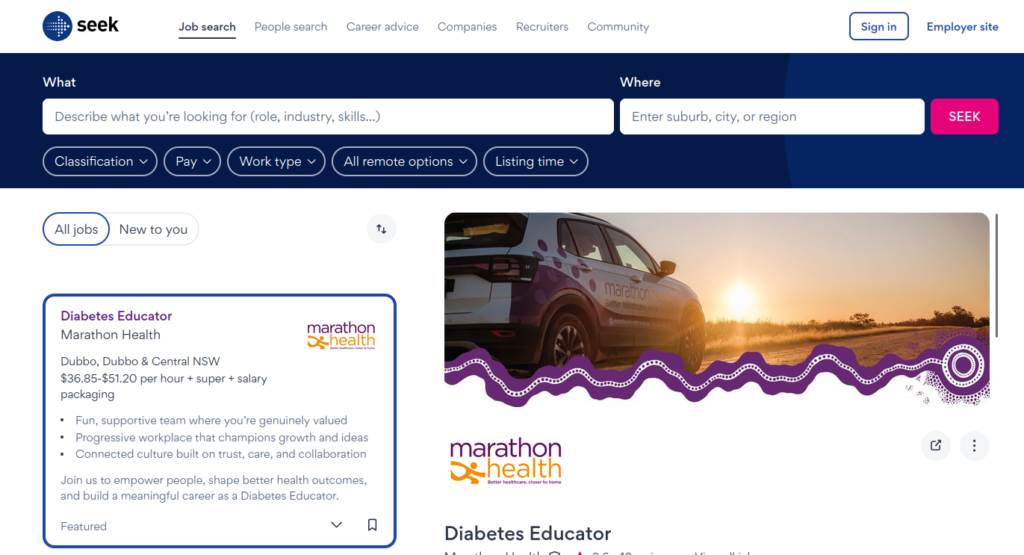
SEEK is the largest job board in Australia and the starting point for the majority of Australian job applications. Understanding how to use it efficiently makes a significant difference to both the quality and the speed of your application process.
Setting Up Your SEEK Profile Before Applying
Go to seek.com.au and create an account using your professional email address. Complete your profile in full before applying for any roles. An incomplete SEEK profile reduces your visibility to recruiters who search the platform’s candidate database.
Upload your resume to your profile. SEEK accepts PDF and Word formats up to 5 megabytes. Once uploaded, SEEK’s Resume Match feature uses your resume content to identify roles that match your skills and experience, which supplements your manual search with passive recommendations.
Set your work type preferences: full-time, part-time, casual, contract, or a combination. Set your preferred locations and indicate whether you are open to remote roles. Be sure to set your salary expectations if you are comfortable doing so, as this helps SEEK’s matching algorithm and saves time filtering out unsuitable listings.
Set your profile visibility to allow recruiters to view your resume. This enables the passive discovery element of SEEK alongside your active applications.
Finding and Filtering Jobs on SEEK
Use SEEK’s search bar with a specific job title or keyword and a location. Start with a precise search rather than a broad one. Seeking project manager in Melbourne will return more relevant results than just manager.
Apply filters to refine your results. The most useful filters for most candidates are: work type (full-time, part-time, contract, casual), salary range, date posted (last 7 days for most active searching), and listed by (employer direct versus agency). Filtering by date posted to the last 7 days is particularly important because applications submitted early in a listing’s lifecycle consistently receive more attention than those submitted days or weeks later.
Before applying for any role, read the full listing carefully. Note the required qualifications, the key responsibilities, the application instructions, and whether a cover letter is requested or optional. Many candidates skim listings and miss specific instructions that the employer considers a screening test in itself.
Save searches that are producing relevant results so you can return to them quickly, and set up job alerts for your most important search criteria so new listings are emailed to you automatically.
Submitting an Application on SEEK
When you are ready to apply, click the Apply button on the listing page. SEEK will show you either a Quick Apply form or redirect you to the employer’s own application portal.
For a Quick Apply submission, follow these steps:
1. Review your pre-filled profile information for accuracy. SEEK populates the application form with your profile details. Check that your name, contact information, and work rights are current and correct.
2. Attach your tailored resume. Use the version you prepared specifically for this role, not your master document. Additionally, confirm the file name reads professionally before uploading.
3. Attach your cover letter if one is required. Even when a cover letter is listed as optional, including a relevant one is almost always the better choice for professional roles.
4. Answer any screening questions carefully. These are mandatory fields that appear below the document upload sections. Read each question carefully before answering. Some screening questions have automatic disqualification thresholds, meaning a wrong answer removes your application before any human reviews it.
5. Review everything before submitting. Read your cover letter one more time and confirm the resume attached is the right version. Check that all fields are complete.
6. Submit the application. A confirmation email from SEEK will arrive within a few minutes. Consequently, save this email or note the application in your tracking spreadsheet.
Important: When SEEK redirects you to an employer’s own careers portal, follow the employer’s instructions carefully. These portals vary significantly in their setup and requirements. Furthermore, create an account on the portal if prompted, as many employers use it to track your application status and communicate with you throughout the process.
How to Apply for Jobs on LinkedIn Step by Step?
(Estai Jobs apply garna lako ss, Nepal ko satta Australia)
LinkedIn operates differently to SEEK in ways that directly affect how you should approach applications on the platform. Know the difference between applying through LinkedIn and being found on LinkedIn, it changes how you invest your time.
Preparing Your LinkedIn Profile Before Applying
Your LinkedIn profile is not a separate document from your application when you apply through the platform. It is the application. When a recruiter receives a LinkedIn application, they view your profile alongside any documents you submit. A strong profile amplifies your application. A weak or incomplete one undermines it.
Before applying for any role on LinkedIn, confirm that your headline includes searchable keywords rather than just your current job title. Your About section should read as a professional introduction that explains who you are, what you do well, and what you are looking for. Your work experience entries should include achievement-focused bullet points for your last two to three roles. Similarly, your skills section should list the terms that appear most frequently in job descriptions for the roles you are targeting.
Customise your LinkedIn URL to linkedin.com/in/yourfullname if you have not already done so. Go to your profile page, click Edit public profile and URL in the upper right corner, and edit the URL in the right panel. A customised URL reads as professional and is easier to include on your resume and in email signatures.
How to Use LinkedIn Easy Apply?
LinkedIn Easy Apply allows you to submit a job application directly through LinkedIn using your stored profile information. It is the fastest application method available on LinkedIn and suits roles where you are a strong fit and want to apply quickly.
Set up your Easy Apply information before using it for the first time. Click Jobs in the LinkedIn navigation bar, search for any role, and click Easy Apply on a listing. LinkedIn will then prompt you to save your phone number and resume for future submissions. Upload your most current resume at this stage.
Follow these steps for every Easy Apply submission:
1. Find the role using LinkedIn’s job search with relevant filters: location, experience level, job type, date posted, and remote or on-site.
2. Click Easy Apply on the listing. A sliding panel will open on the right side of the screen.
3. Review and update your contact information. Check that the phone number and email address are correct.
4. Upload or confirm your resume. If the role requires a tailored resume, upload the specific version rather than using the default saved document.
5. Answer any additional questions the employer has included. These may cover years of experience, work rights status, or willingness to relocate.
6. Review your application summary before submitting. Check that all information is accurate and complete.
7. Submit. LinkedIn will confirm your submission and save it to your Applied Jobs list under the Jobs section.
Easy Apply is convenient but has one significant limitation worth understanding. Roles with Easy Apply enabled typically receive a much higher volume of applications because the barrier to apply is lower for everyone. Consequently, for roles you are particularly serious about, applying directly through the company’s own careers portal reduces your competition significantly.
Applying Through a Company Website Directly via LinkedIn
Many LinkedIn job listings redirect to the company’s own careers portal when you click Apply. This is the case for most large employers, government organisations, and companies that use dedicated applicant tracking systems. When this happens, you will need to create an account on the employer’s portal, complete their specific application form, and upload your documents directly.
These portals vary significantly. Some are simple one-page forms. Others are multi-step processes that can take 30 to 45 minutes to complete properly. Factor this time into your application planning rather than starting an application when you have limited time available.
Save your login credentials for every employer portal you create an account on. Many Australian employers use the same ATS platform, which means you may be able to use an existing account rather than creating a new one. Always save a copy of your application confirmation from these portals.
How to Apply for Jobs on CloudColleague Step by Step?
CloudColleague offers a different model to traditional job boards and is worth understanding clearly before you apply. Where SEEK and LinkedIn are primarily platforms for advertising permanent and contract employment roles, CloudColleague enables three distinct types of work opportunities: jobs, tasks, and services.
Understanding the Three Types of Opportunities on CloudColleague
Jobs on CloudColleague are traditional employment listings for ongoing or fixed-term roles, similar to what you would find on SEEK. They are posted by businesses that need a professional to fill a position on a more permanent basis.
Tasks are short-term, project-based, or one-off pieces of work with a defined scope, a specific deliverable, and an agreed payment. They are ideal for professionals who want to earn income between permanent roles, build experience in a new field, supplement a current income, or test a career direction before committing to it fully.
Services are packaged professional offerings that professionals list on the platform and businesses can purchase directly. If you offer a defined service, such as logo design, copywriting, bookkeeping, web development, or photography, you can create a service listing that lets clients engage with you and pay without a lengthy negotiation process for each project.
Understanding which type of opportunity suits your current situation allows you to search and apply more efficiently rather than browsing everything on the platform.
Creating Your CloudColleague Profile
Go to cloudcolleague.com and create a professional account. Choose a username that reflects your professional identity rather than a personal nickname.
Complete your professional profile in full before applying for anything. Your profile is what a business sees when they receive your application or browse professional listings. It should include a professional profile photo, a clear description of your skills and experience, your availability and preferred work type, and your location.
Write your profile description the same way you would write a LinkedIn About section: in the first person, focused on what you do, what you do well, and what types of work you are looking for. Be specific about your areas of expertise rather than trying to appear available for everything.
Upload supporting documents if relevant: a resume for job applications, portfolio samples for creative or technical roles, and any certifications or qualifications that are relevant to the types of work you are pursuing. The more complete and specific your profile, the more credible your applications appear to businesses reviewing them.
How to Apply for a Job or Task on CloudColleague?
Search for opportunities using the platform’s filters feature. Filter by work type (job, task, or service), category or industry, location or remote availability, and budget range for tasks and services.
Read each listing carefully before applying. Note the scope of the work, the budget or salary range, the timeline, the required skills, and any specific instructions about how to apply or what to include in your application.
When submitting an application or proposal, personalise it specifically to the listing rather than sending a generic introduction. For a job application, follow the same approach as any professional application: a brief introduction, your most relevant experience, and a clear statement of why you are a good fit. For a task proposal or bid, address the specific deliverable described in the listing, outline how you would approach it, provide evidence of relevant experience, and state your availability and proposed timeline.
After submitting, the platform facilitates direct communication between you and the business. Respond to any messages promptly and professionally. A quick, clear response to a business inquiry is often what determines whether you are selected over another candidate with similar qualifications.
Once work is agreed and completed, payment is processed securely through the platform. Unlike other platforms, CloudColleague only charges a 7% commission on the task bid amount, which means the majority of the amount is paid to you directly into your listed bank account.
Read Guides on Tasks to get more information on tasks.
How to Apply for Government Jobs Online in Australia?
Government job applications in Australia are structured differently to private sector applications in ways that catch many candidates off guard. Understanding those differences before you apply is the difference between a competitive submission and one that is screened out on a technicality.
The defining feature of Australian government job applications, at both federal and state level, is the selection criteria response. Where a private sector application typically consists of a resume and cover letter, a government application often requires you to address a set of specific capability statements in writing as a mandatory part of the application. These are the selection criteria, and they are not optional fields.
What Selection Criteria Are and How to Answer Them?
Selection criteria are specific statements of the capabilities, experience, or qualifications a role requires. For each criterion, provide a written response demonstrating that you meet it with specific evidence from your professional history.
The STAR method is the standard structure for selection criteria responses in Australian government applications. Describe the Situation briefly, then explain your specific Task or responsibility. Detail the Actions you took in the first person and state the Result with quantifiable outcomes where possible. Each criterion response typically has a word limit of 250 to 500 words.
The most common mistake is providing a general statement rather than a specific example. “Writes clear and accurate reports to diverse audiences” is a capability statement, not a response. However, “I developed plain-English policy briefings for a ministerial audience during legislative change, receiving direct feedback that the documents significantly improved stakeholder understanding” is a genuine response.
APSJobs is the central advertising platform for federal government roles across all agencies and departments. Most federal applications are submitted through APSJobs or through the specific agency’s own recruitment portal. Consequently, create an account on APSJobs if you are targeting federal government roles.
Each state and territory has its own government jobs portal. New South Wales uses I Work for NSW, Victoria uses Careers Victoria, and Queensland uses Smart Jobs. Locate and create an account on your state’s specific portal before applying.
Australian government recruitment processes move significantly slower than private sector ones. Four to six weeks from application close to interview is common. Furthermore, eight to twelve weeks from application to offer is not unusual. Do not withdraw other applications assuming a government process will move quickly.
How to Fill In an Online Job Application Form Properly?
Most online job applications require you to complete a structured form in addition to uploading your resume and cover letter. These forms are processed by applicant tracking systems before a human reviewer sees them, which means how you complete them affects your application’s automated score as much as the quality of your attached documents.
Personal and Contact Information
Fill in every personal information field accurately and completely. Your name should match your resume exactly. Your email address should be your professional one. And Your phone number should be the one you actively monitor.
Work rights is a field that appears on almost every Australian job application. Select the option that accurately describes your situation. If you are an Australian citizen or permanent resident, select that. If you are on a temporary visa, select the appropriate option and include your visa subclass if asked. Do not select a status that overstates your entitlements. Work rights misrepresentation is a documented ground for termination under Fair Work Australia guidelines and is taken seriously by Australian employers.
Employment History Fields
Many application forms ask you to re-enter your employment history in structured fields even when you have attached a resume. This is not redundant from the employer’s perspective: the structured fields feed directly into the ATS database in a way that an attached resume document does not.
Enter your employment history in reverse chronological order, most recent role first, using consistent date formatting. Month and year format, for example March 2022 to January 2024, is the Australian standard. Avoid using only years when months are requested, as gaps in a month-and-year chronology are immediately visible in a way they are not in a year-only format.
For the reason for leaving the field, use neutral, forward-looking language in every case. Seeking new challenges and opportunities, career progression, contract concluded, and company restructure are all acceptable descriptions. Negative commentary about a former employer in a structured application form is particularly damaging because it is recorded in the ATS database rather than just read once and forgotten.
Screening Questions and Selection Criteria
Screening questions are mandatory questions that appear within the application form and are used to filter candidates before a recruiter reviews anything else. They typically take the form of yes or no questions about minimum requirements, for example do you have the right to work in Australia, or short-answer questions about specific experience.
Read every screening question carefully before answering. Some questions have automatic disqualification thresholds built into the ATS. Answering no to do you have a current driver’s licence on an application where a licence is a listed requirement will remove your application from the shortlist automatically, regardless of the strength of your resume. If a requirement is listed as essential and you do not meet it, reconsider whether the application is worth submitting.
For short-answer screening questions or selection criteria that appear within the form, respect word count limits. Answers that significantly exceed the word limit are sometimes truncated by the system, which means your response is cut off at a point you did not choose. Write to the limit, not beyond it.
References in Application Forms
When an application form asks for referee details, provide two to three contacts. Your most recent direct manager is the most credible referee for professional roles. A senior colleague, a client, or an academic supervisor are acceptable alternatives depending on your career stage and the role.
Always notify your referees before listing them on any application. A referee who is contacted without warning and cannot clearly recall your work will provide a less persuasive reference than one who has been briefed on the role and given time to prepare. Send each referee a brief message when you list them: let them know the role, the employer, and the key experience or qualities you hope they can speak to.
Write a Targeted Cover Letter for an Online Application
Every cover letter you submit as part of an online application should be written for the specific role and employer rather than adapted from a generic template. The distinction between a targeted cover letter and a generic one is immediately apparent to an experienced recruiter and directly affects whether your application advances.
Opening Paragraph: Make It Specific
The opening paragraph of your cover letter should establish in the first two sentences that you have thought about why you want to work for this employer in particular. The most common cover letter opening in Australia is I am writing to apply for the position of, which tells the recruiter nothing they do not already know and wastes the highest-value real estate in the document.
A strong opening references something specific about the company or role that you found through your research and connects it to your own professional direction.
Weak: I am writing to apply for the Senior Project Manager position at Constructa Group as advertised on SEEK. Strong: Constructa Group’s recent expansion into sustainable commercial construction, and the emphasis in this listing on leading technically complex projects across multiple stakeholder groups, is exactly the kind of scope I have been building toward. With seven years of project management experience in commercial construction and a consistent record of delivering above-budget projects on schedule, I believe I can contribute to the direction you are heading.
Middle Paragraph: Your Strongest Evidence
The middle paragraph connects your most relevant professional experience to the most important requirement in the job description. Identify the single most important thing the employer needs from the person in this role and address it directly with a specific example and a quantified outcome.
Do not repeat your resume in paragraph form. A cover letter that describes the same information as the resume in different words adds no value and wastes a recruiter’s time. Use the cover letter to highlight one thing and make it vivid, not to summarise everything.
In my most recent role as Senior Project Manager at Meridian Civil, I led the delivery of a $4.2 million urban renewal project across a site with active heritage overlays, coordinating input from council, heritage consultants, and a contractor workforce of 40. The project was delivered three weeks ahead of programme and 6 percent under budget, and was cited by the client as a benchmark for their future procurement approach.
Closing Paragraph: Direct and Confident
The closing paragraph of your cover letter should express clear interest in the role and invite the next step without sounding uncertain or pleading. Keep it to two to three sentences.
I would welcome the opportunity to discuss how my experience aligns with what you are building at Constructa Group. I am available for an interview at your convenience and happy to provide any additional information that would be useful. And I look forward to hearing from you.
This closing is confident, professional, and specific without being presumptuous. It names the company, extends an invitation, and expresses forward-looking interest. That is all a closing paragraph needs to do.
Apply for Multiple Jobs Online Without Losing Quality
The pressure of an active job search can push candidates toward volume: applying for as many roles as possible in the hope that more applications produce more interviews. The data does not support this approach. A smaller number of well-targeted, properly tailored applications consistently produces better interview rates than a large volume of generic ones.
A practical system for managing multiple applications without sacrificing quality is to categorise roles into three tiers before applying.
| Tier | What It Means | Application Approach |
| Tier 1 | Your top targets. Roles you are genuinely well-suited for and excited about. | Fully tailored resume and cover letter. Apply within 24 hours of listing. Follow up professionally after 5 to 7 days. |
| Tier 2 | Good fits. Roles you meet most requirements for but with some gaps. | Lightly tailored resume. Cover letter with specific opening paragraph but standard body. Apply within 48 hours. |
| Tier 3 | Possibilities. Roles that are adjacent to your target or where fit is less clear. | Minimal tailoring. Cover letter optional unless required. Apply when time permits. |
Track every application in a simple spreadsheet with the following columns: role title, company, platform, date applied, tier, current status, follow-up date, and outcome. Review it at the start of each week to identify which applications need a follow-up and which have progressed to the next stage. An untracked job search produces confusion, missed follow-ups, and duplicate applications to the same employer, all of which damage your professional credibility.
What to Do After Submitting a Job Application Online?
Most candidates submit an application and then wait passively. However, the candidates who move through the hiring process most efficiently treat the post-submission period as an active phase.
The confirmation email that arrives after submitting is not an indication that a human has reviewed your documents. It is a system-generated acknowledgement that your application has been received. The actual review process, involving ATS filtering followed by recruiter shortlisting, begins separately on a timeline determined by the employer.
Add the application to your tracking spreadsheet immediately after submitting while the details are fresh. Note the role title, employer, platform, date, and any specific instructions the listing gave about the hiring timeline.
After five to seven business days from the application closing date, send a brief professional follow-up email to the hiring contact if one was listed. Keep the email to three sentences. Confirm which role you applied for, reiterate your interest and one specific reason for it, and invite them to reach out if additional information would be helpful. One follow-up is appropriate. Two is acceptable if the first produced no response after two weeks. Beyond that, move on.
While you wait, continue applying. Treat each application as a single point of activity in a larger process rather than an all-or-nothing event. Candidates who approach job searching with consistent weekly activity find employment faster. Specifically, those with a defined number of applications per week, a structured follow-up routine, and a practice of reviewing what is and is not producing results consistently outperform those who apply intensively for a week and then stop.
Read next: How to Find a Job Online in 2026 full guide on the job search process
Read next: How to Prepare for a Job Interview start preparing before the interview invitation arrives
Common Mistakes When Applying for Jobs Online
The mistakes that consistently undermine online job applications in Australia are avoidable. Most of them take less than two minutes to fix if you catch them before submitting. Most of them are invisible to the candidate who made them and obvious to the recruiter who receives the application.
Submitting Without Tailoring
Sending the same resume and cover letter to every role you apply for is the most common application mistake and the one with the most direct impact on your results. A generic cover letter opening, a resume with skills that do not match the job description terminology, and no evidence that you have read the specific listing are all immediately recognisable to experienced recruiters. Fix it before you submit by spending 20 minutes on every application you care about.
Uploading the Wrong File Version
Attaching your master resume instead of your tailored version, or attaching a previous employer’s version of a document by accident, is more common than most candidates would like to admit. Before clicking submit on any application, open the attached file and confirm it is the correct version. This takes 30 seconds and prevents an embarrassing and uncorrectable mistake.
Answering Screening Questions Carelessly
Automatic disqualification thresholds in ATS screening questions remove applications before a human reviews them. A wrong answer to a question about minimum requirements, work rights, or a mandatory qualification eliminates your application regardless of how strong everything else is. Read every screening question carefully and answer accurately.
Not Saving a Copy of Your Application
If you are asked about your application at an interview and cannot recall which version of your resume you submitted, which specific examples you used in your cover letter, or how you answered particular screening questions, you are at a disadvantage. Save a copy of every document you submit and note the key details of each application in your tracking spreadsheet.
Submitting Without Proofreading
A single spelling error in a cover letter is cited by Australian recruiters as sufficient reason to remove a candidate from consideration. It signals carelessness in a document that, by definition, represents your best professional effort. Use Grammarly or an equivalent tool, then read the document aloud to catch errors that automated tools miss, before submitting anything you care about.
Applying for Roles Where You Do Not Meet the Minimum Requirements
A role that lists a mandatory qualification you do not hold and specifies that applications from candidates without it will not be considered is not a role worth applying for. The time spent on that application is time taken away from roles where you are genuinely competitive. Filter your search to roles where you meet at least the essential requirements before investing in an application.
How to Apply for Remote Jobs Online in Australia?
The application process for remote roles in Australia follows the same steps as any other online application with a few targeted adjustments that directly address what employers evaluating remote candidates are looking for.
Use the remote filter on SEEK and LinkedIn to identify roles that are explicitly designated as fully remote or hybrid. On CloudColleague, most task and service-based work is inherently remote because the work is delivered digitally. When reading a listing for a role described as remote, look for specific language that signals genuine organisational support: phrases like remote-first team, distributed workforce, or async-friendly environment are positive signals. A phrase like open to remote for the right candidate suggests the arrangement is conditional rather than structural.
In your resume and cover letter for a remote application, explicitly address your capacity for effective remote work. This includes a brief mention of your home office setup if it is professional, evidence of previous remote or independent work if you have it, and language that demonstrates self-management and proactive communication. These qualities are the primary concerns of hiring managers evaluating remote candidates, and surfacing them in your application removes the uncertainty that often causes remote applicants to lose out to in-person candidates.
If you have not worked remotely before, use your cover letter to address this directly and positively. Describe the aspects of your working style that align with effective remote work: your ability to manage your own schedule, your comfort with digital communication tools, and your track record of delivering results without close supervision. Honest and specific framing of this kind is more persuasive than leaving the question unanswered for the employer to resolve in their own imagination.
Every Strong Application Starts With the Same Thing: Preparation
The difference between an application that produces an interview and one that produces silence is rarely the gap between qualified and unqualified. It is almost always the gap between prepared and unprepared. A tailored resume, a specific cover letter, a complete and accurate application form, and a professional follow-up are the four variables that you have direct control over in every single application you submit.
The platforms are tools. SEEK, LinkedIn, CloudColleague, and the rest are channels for reaching employers. What you put through those channels, and how carefully you prepare it, determines what comes back.
Start today. Update your resume. Create your profiles. Set your job alerts. Submit your first tailored application. Track it. Follow up. Repeat.Ready to apply right now? Browse current jobs, tasks, and professional opportunities on CloudColleague and submit your first application today at cloudcolleague.com.
Frequently Asked Questions About Applying for Jobs Online
Create profiles on SEEK, LinkedIn, and CloudColleague. Prepare an updated resume, a cover letter template, and a professional email address. Read each listing, attach documents, and submit. Track every application and follow up after five to seven business days.
Create a SEEK account at seek.com.au and upload your resume. Search using keywords and location filters, read listings in full, and click Apply. Complete the Quick Apply form, attach your tailored documents, and submit. Save your confirmation email.
Create an account at cloudcolleague.com and complete your profile with a clear description of your skills and availability. Search for jobs, tasks, or services and submit a personalised proposal addressing the specific opportunity. Payment is processed securely through the platform.
Not for every role, but include one for most professional, management, and government positions even when listed as optional.
Most federal roles are advertised through APSJobs at apsjobs.gov.au. Each state has its own portal. Hiring timelines are significantly longer than private sector, often four to twelve weeks.
Five to ten well-targeted applications per week produce better results than 30 generic ones. Focus your highest effort on roles where you are genuinely well-suited and track everything consistently.
Your application enters the employer’s ATS, which filters submissions. Applications passing the filter are then reviewed and shortlisted. Smaller employers may respond within a week. Larger organisations often take two to four weeks or longer.