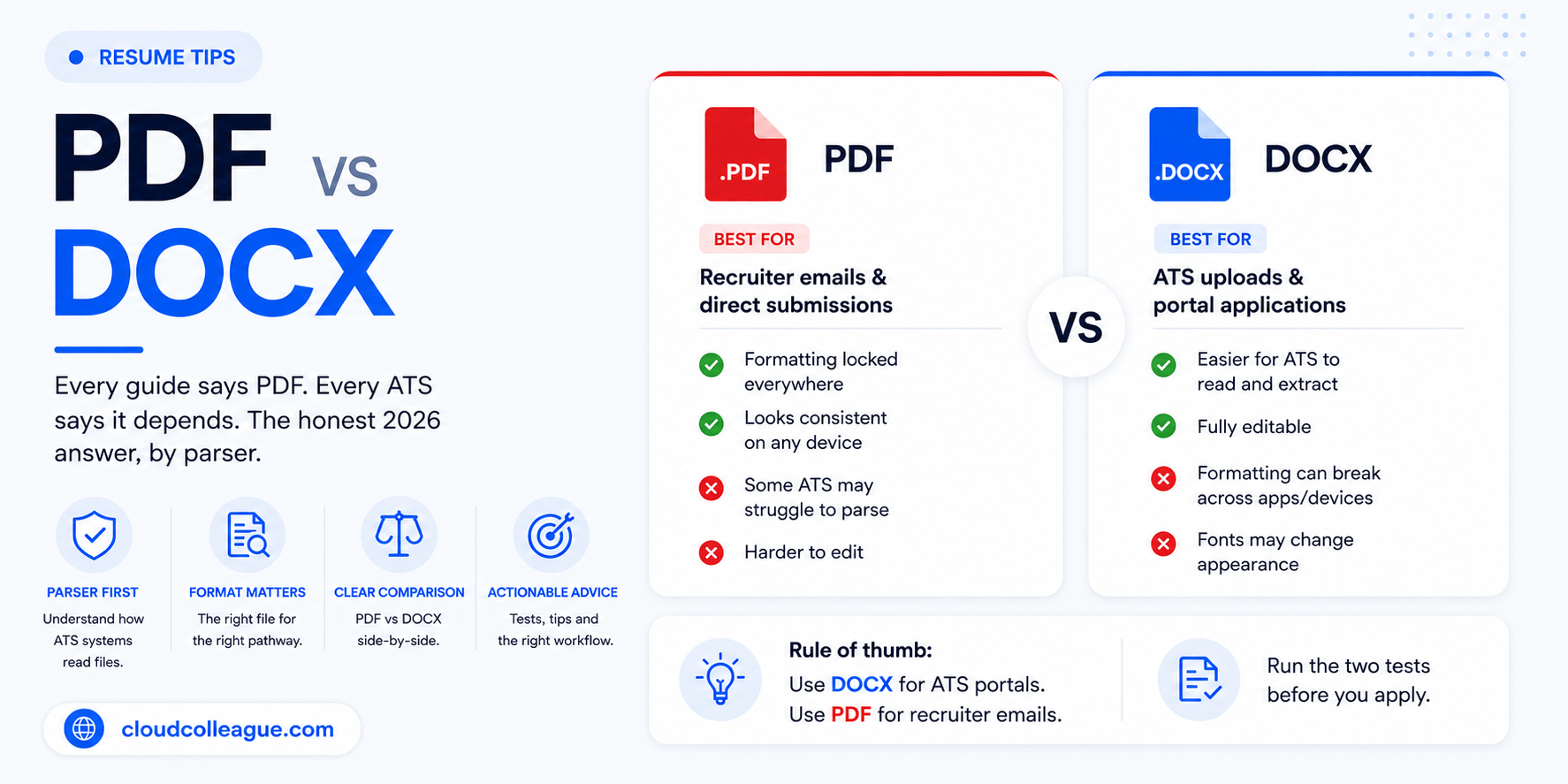
Search for PDF vs DOCX resume advice and you will get contradictory answers. One article tells you PDF is the modern standard. The next tells you DOCX is the ATS-safe default. Both are partially correct, and the contradiction exists because neither one is asking the right question.
The right question is not which format is better overall. It is which format suits your specific submission pathway.
An ATS portal upload behaves differently from a direct recruiter email. A platform application behaves differently from a government job portal. A staffing agency submission has its own rules entirely. The format decision follows from the submission pathway, not from a universal preference.
In this guide, we explain what ATS systems actually do with each file format, when DOCX wins, when PDF wins, and the two simple tests you can run in under two minutes to confirm your resume file is safe before you apply.
Resume format sorted? Find verified Australian employers who are actively hiring right now. CloudColleague connects Australian professionals with 18,000+ verified employers across every industry. AI-matched to your profile.Browse open roles on CloudColleague
How ATS Systems Actually Read Your Resume File?
Before the format debate makes sense, it helps to understand what an Applicant Tracking System actually does when it receives your resume.
When you upload a resume through an employer portal, the ATS does not simply store your file. It parses it. The system extracts text from the document, categorises that text into structured data fields (your name, contact details, job titles, employer names, dates, skills, and education), and then matches that extracted data against the requirements of the job description.
Your resume is scored and ranked based on this extracted data, not on how your resume looks. The ATS never sees your formatting. It only sees the text it can extract. The resume writing tips article on CloudColleague teaches you about the important aspect to follow.
This is why file format matters. The format determines how reliably the ATS can extract your text. A format that breaks text extraction does not just cause a formatting problem. It causes your keywords, job titles, and qualifications to be misread, misfiled, or missed entirely.
The ATS platforms most commonly used by Australian employers in 2026 include Workday, Taleo, Greenhouse, iCIMS, Lever, and SAP SuccessFactors. Each handles file formats slightly differently, but the core parsing logic is the same across all of them.
Read Next: Resumegenius vs Zety (2026): Which Resume Builder Actually Wins?
DOCX Resume: When It Wins and When It Does Not
DOCX is the native format of Microsoft Word and the most universally compatible format for ATS text extraction.
Why DOCX Is the ATS-Safe Default for Portal Submissions?
Every ATS platform ever built can read a DOCX file. This includes legacy systems like Taleo that date back to the early 2000s and are still in active use at many large Australian employers in banking, mining, and professional services.
Text extraction from a clean, single-column DOCX is highly predictable. The ATS reads paragraph text sequentially, in the order it appears in the document, without the rendering complexity that PDFs can introduce. Job titles, employer names, employment dates, and skills are extracted cleanly and placed into the correct data fields.
ATS portal uploads on Workday, Greenhouse, iCIMS, and SEEK employer portals handle DOCX consistently. Resume parsers that autofill candidate profiles from uploaded files also handle DOCX more reliably than PDF in most cases, because the underlying XML structure of a DOCX file is easier to parse than a PDF’s rendering instructions.
For these reasons, DOCX remains the conservative, reliable default when you are uploading through an employer’s online application portal and you are not sure which ATS system sits behind it.
The Risks of DOCX You Need to Know
Font rendering is DOCX’s main vulnerability. If the recruiter or hiring manager opens your DOCX file using a different version of Microsoft Word, or on a Mac without your specific fonts installed, your carefully designed resume can break. Text may overflow, margins may shift, and a one-page resume can suddenly become two pages with inconsistent spacing.
Accidental editing is a secondary risk. A DOCX file can be modified when someone opens it. A recruiter who accidentally deletes a line or reformats a section may not notice the error before passing your file to a hiring manager.
External recruiters and staffing agencies in Australia frequently request DOCX files so they can remove your contact details and add their own agency branding before presenting you to a client employer. This is a legitimate and common practice. It is an additional reason to always maintain a DOCX version of your resume regardless of which format you normally submit.
PDF Resume: When It Wins and When It Does Not?
PDF is the most visually consistent format and the preferred choice for direct recruiter submissions.
Why PDF Is the Right Choice for Direct Recruiter Emails?
Formatting preservation is PDF’s defining advantage. A PDF looks identical on every device, every operating system, and every version of Adobe Reader or any PDF viewer. What you design is what the recruiter sees, without any risk of fonts shifting or layouts breaking.
Modern ATS platforms have caught up with PDF in 2026. Greenhouse, Lever, Workday, and iCIMS all parse text-based PDF files reliably. The distinction that matters is between a text-based PDF and an image-based PDF, which we cover in the testing section below.
PDFs also carry no macro risks. Some enterprise IT environments flag DOCX files because Word documents can carry malicious macros. A PDF does not have this vulnerability, which matters when submitting to large corporate employers with strict IT security policies.
When you email your resume directly to a recruiter or hiring manager rather than uploading it through a portal, PDF is almost always the better choice. The formatting is guaranteed, the file cannot be accidentally edited, and it presents a more polished professional impression.
The Risks of PDF You Need to Know
Image-based PDFs are the most serious risk in this format. If your PDF was created by scanning a printed resume, printing to PDF from a design tool like Canva with complex graphics, or exporting from an application that renders text as images rather than extractable characters, the ATS cannot read it at all. Your entire resume becomes invisible to automated screening.
Overdesigned PDFs are a related problem. Even a text-based PDF created from a two-column Canva template, with sidebar columns, icons, progress bars, and decorative text boxes, causes ATS text extraction to break. The ATS reads text in a linear flow and cannot reconstruct content that is visually arranged in columns rather than sequentially in the underlying file structure.
Legacy ATS systems remain a genuine concern for some Australian employers. Taleo installations at older enterprise companies can struggle with PDF parsing in ways that a DOCX submission would avoid. If you know a large corporate employer uses a legacy ATS and you are not sure of its PDF capability, DOCX is the safer choice.
Australian government and academic portals sometimes specifically require DOCX or Word format. Always read the application instructions on APS Jobs and state government recruitment portals before uploading.
Resume file format decided. Make sure you are applying to the right Australian roles. Browse AI-matched jobs on CloudColleague across tech, admin, health, trades, and more.Find your next role on CloudColleague
PDF vs DOCX Resume: Head-to-Head by Submission Pathway
This is the comparison no other article provides. The format decision follows from how you are submitting, not from a universal preference for one format over the other.
| Submission Pathway | Recommended Format | Reason |
| ATS portal upload (Workday, Taleo, Greenhouse, iCIMS) | DOCX | Most reliable parsing across all ATS versions |
| SEEK job application upload | Either (DOCX marginally safer) | SEEK converts uploads; DOCX safer for older employer accounts |
| CloudColleague application upload | Either (PDF preferred) | PDF preserves formatting across employer views |
| Direct email to recruiter or hiring manager | Formatting preserved, cannot be accidentally edited | |
| Staffing agency submission (Hays, Robert Half, Michael Page) | DOCX | Agencies reformat and rebrand before presenting to clients |
| Australian government or public sector portal | Follow instructions | Many portals specify DOCX; always read the requirements |
| LinkedIn Easy Apply | Formatting preservation across LinkedIn’s viewer | |
| Employer specifies a format in the job posting | Follow the instruction | Always defer to explicit instructions regardless of your preference |
The final row is the most important rule in this table. When an employer specifies a format, follow it without exception. Any other consideration is secondary to the stated requirement.
Read Next: Teal vs Huntr (2026): Which Job Tracker App Is Actually Worth Using?
The Two Tests to Check Your Resume File Before Applying
These tests take under two minutes each. Running them once before your first submission with a new resume file removes significant risk from every subsequent application.
Test 1: The Copy-Paste Test for PDF Files
Open your PDF resume in Adobe Reader, Chrome, or any PDF viewer. Select all the text using Ctrl+A on Windows or Command+A on Mac. Copy the selected text. Open a plain text editor such as Notepad on Windows or TextEdit on Mac. Paste the copied text.
Read through what you see. If the text appears in the correct order, your name and contact details at the top, then your summary, then your experience entries in chronological order, then education, your PDF is text-based and ATS-safe.
If the text is garbled, appears in a random or mixed-up order, contains strange characters, or does not paste at all, your PDF is image-based. Do not submit it without regenerating it correctly from a clean DOCX source.
Test 2: The Formatting Consistency Check for DOCX Files
Open your DOCX resume in Google Docs by uploading it to Google Drive. Review how it renders in the browser-based viewer.
Check whether your fonts have been substituted with alternatives, whether your margins and spacing have shifted, and whether any sections have moved out of place. If the document looks significantly different from how it appears in Microsoft Word, your formatting relies on fonts or settings that are not universally installed. This means a recruiter on a Mac or an older version of Word may see a broken layout when they open your file.
If the Google Docs rendering is acceptable but imperfect, consider using PDF for human-read submissions such as direct recruiter emails, while keeping DOCX for portal uploads where the ATS handles the file before any human views it.
Want to skip the headache of resume? Start with tasks on CloudColleague according to your skills.
The Right Workflow: Keep Both Versions Ready
Rather than committing to one format permanently, the most practical approach is a simple four-step workflow that covers every submission pathway.
Step 1: Build and maintain your resume as a master DOCX file in Microsoft Word or Google Docs. This is your editable source document. All updates, tailoring, and keyword adjustments happen here.
Step 2: Export a PDF version from your master DOCX using Word’s built-in Save As PDF function (File, Save As, PDF) or Google Docs Export as PDF. Do not use Print to PDF, do not export from Canva or design tools, and do not scan a printed version. These methods risk creating an image-based PDF.
Step 3: Run the copy-paste test on your exported PDF once, before the first time you use it, to confirm it is text-based and ATS-safe. If it passes, it is ready to use for direct recruiter email submissions.
Step 4: Choose your format based on the submission pathway. ATS portal upload: DOCX. Direct email to recruiter: PDF. Staffing agency request: DOCX. Employer specifies a format: follow the instruction.
Maintain both files, name them clearly, and update both every time you make a change to your resume content.
What Australian Job Seekers Specifically Need to Know
Most resume format advice is written for the US job market. Several things work differently for Australian job seekers.
SEEK is Australia’s dominant job board and accepts both PDF and DOCX uploads. SEEK converts all uploaded resumes to a standardised format for display to employers. A clean, single-column DOCX or a text-based PDF from a simple template performs equivalently on SEEK in most cases. If you are unsure, DOCX is the marginally safer default for SEEK uploads.
CloudColleague accepts both PDF and DOCX formats for seeker profile uploads and direct job applications. PDF is recommended for formatting consistency across different employer views on the platform. Uploading a clean PDF ensures your resume looks the same to every employer who views your profile.
Australian government and public sector roles on APS Jobs and state government portals frequently specify file format requirements in their application instructions. These portals sometimes only accept DOCX or Word format, particularly for older systems. Always read the specific instructions for each government role before uploading. Never assume either format is acceptable.
Australian staffing agencies including Hays, Robert Half, Robert Walters, Hudson, and Michael Page routinely request DOCX files so they can remove your contact information and add their agency branding before presenting your resume to client employers. If a recruiter from any of these agencies contacts you, have your DOCX master file ready to send immediately.
Large Australian corporate employers in banking, professional services, resources, and healthcare that use Workday or Taleo-based portals are best served by DOCX uploads. These systems parse DOCX reliably even in their older configurations. PDF works on Workday in 2026 but DOCX remains the safer default for legacy Taleo installations.
Resume format confirmed and file tested. Now find Australian employers worth applying to. Create a free verified profile on CloudColleague and get AI-matched to roles from 18,000+ verified Australian businesses hiring right now.Get started free on CloudColleague
Hiring and need pre-vetted candidates fast? Post a role or task in under five minutes on CloudColleague. Smart matching finds the right people. No agency fees.Start hiring on CloudColleague
Frequently Asked Questions
The answer depends on your submission method. For ATS portal uploads through Workday, Taleo, Greenhouse, or SEEK, DOCX parses most reliably across all ATS versions. For direct email submissions to recruiters, PDF preserves formatting perfectly. However, always follow any format specified in the job posting.
Yes, most modern ATS platforms read text-based PDFs reliably in 2026. These include Greenhouse, Lever, Workday, and iCIMS. However, image-based PDFs from scanned documents fail parsing. Additionally, PDFs with two-column layouts or sidebars break text extraction. Run the copy-paste test before submitting.
Open your PDF, select all text with Ctrl+A or Command+A, then paste into Notepad. If text appears in correct order and reads cleanly, your PDF is ATS-safe. However, garbled or randomly ordered text means your PDF is image-based. Regenerate it using Word’s Save As PDF function.
Two reasons exist. Firstly, staffing agencies request DOCX files to remove your contact details and add agency branding before client presentations. Additionally, hiring managers prefer editable files for annotation or internal reformatting. Always maintain your master DOCX file for quick responses.
SEEK accepts both formats and converts uploads to a standardised display. Clean text-based PDFs and single-column DOCX files perform equivalently. However, DOCX is marginally safer due to predictable conversion. Crucially, content and formatting quality matter more than the file format itself.