In Australia, more than 18,000 businesses now hire on CloudColleague, and a strong CloudColleague resume profile puts you in front of them. Your profile is more than a document sitting in a folder. It is a free, verified professional profile that gets you AI-matched to real roles. So setting it up well is one of the highest-return things you can do in your job search.
This guide walks you through the whole process, step by step. You will create your profile, get verified, and start receiving matched opportunities. Better still, it takes only a few minutes.
| Ready to start? Create your free CloudColleague profile now. |
What Is a CloudColleague Resume Profile?
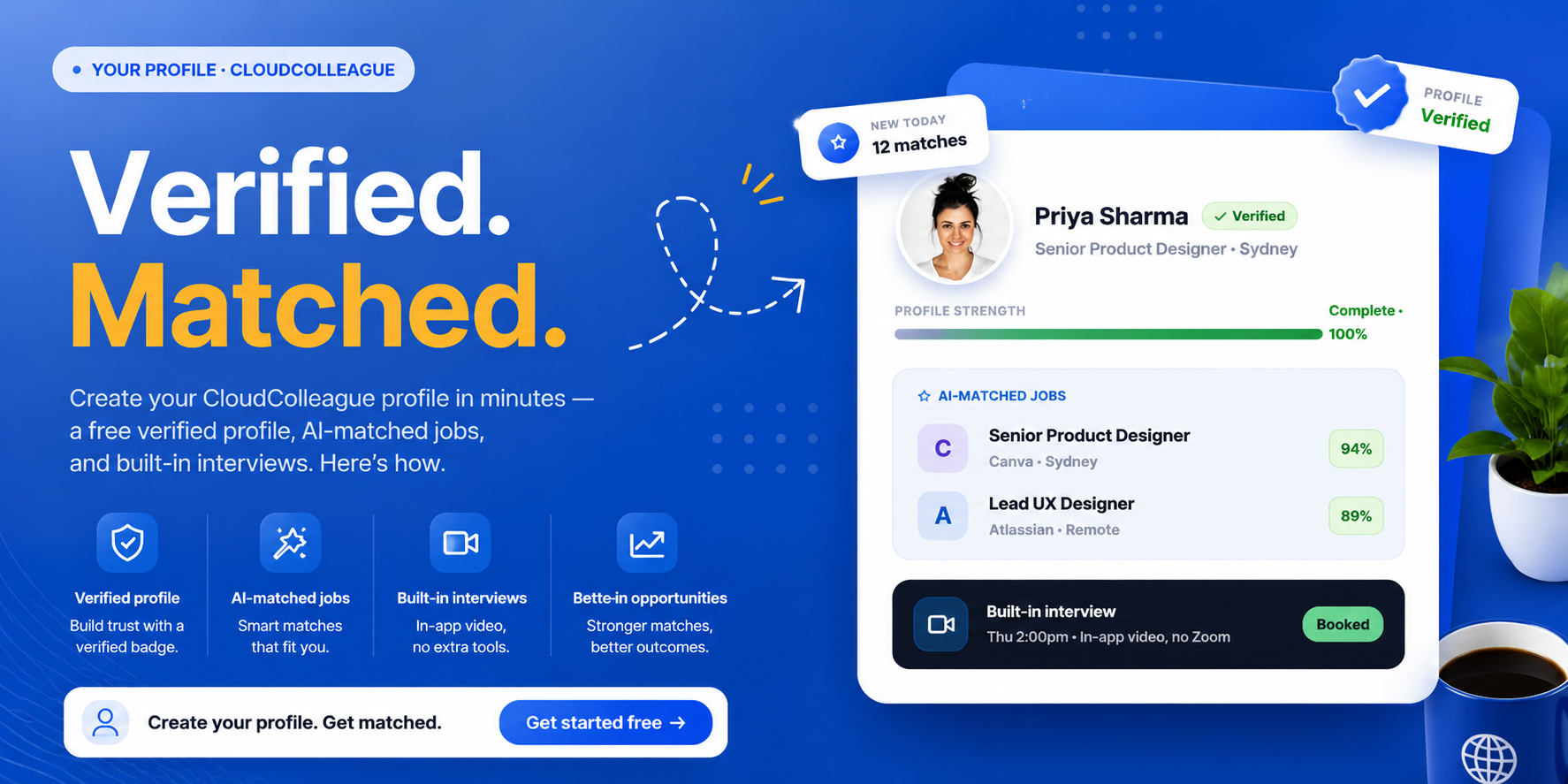
A CloudColleague resume profile is your free, verified professional identity on the platform. It showcases your skills, experience, and availability in one place. Employers and the matching system both read it to decide if you fit a role.
Crucially, it works for two kinds of work. You can use it to land permanent and contract jobs, or to pick up one-off tasks. The verified badge also builds trust, so employers know you are a real, checked professional. That trust gives you an edge over anonymous applicants elsewhere.
Read Next: How to Create a Resume Online for Free? (Step-by-Step Guide)
How to Create Your CloudColleague Resume Profile in 5 Steps?
Setting up your profile is quick and free. Follow these five steps in order, and you will be ready to get matched. Each step takes only a minute or two.
Step 1: Sign Up Free
First, head to the sign-up page and create your account as a job seeker. The process is free and takes moments. You only need an email address to begin. Sign up free on CloudColleague to get started.
Step 2: Add Your Details or Upload Your Resume
Next, fill in your work experience, skills, and education. If you already have a resume, upload it to pre-fill your profile fast. Then review each section for accuracy and detail. For help writing strong content, see our resume writing guide.
Step 3: Get Verified
Now complete the verification step to earn your verified badge. This badge signals to employers that you are a genuine, checked professional. As a result, your profile carries more weight than an unverified one. Verification is a small step with a big payoff.
Step 4: Set Your Preferences for AI Matching
This step powers your job matches, so take care with it. Add your target roles, preferred work type, location, and availability. The more accurate your preferences, the better the AI matches you. In short, good inputs lead to better opportunities.
Step 5: Publish and Get Matched
Finally, publish your profile to make it live. From there, CloudColleague surfaces AI-matched job recommendations built around your details. You can then explore roles and apply with confidence. To learn the full search-and-apply process, see how to use CloudColleague to find jobs.
Read Next: Best Resume Builders Online (Free & Paid)
How AI Job Matching Works on CloudColleague?
The matching system is the heart of the platform, and your profile feeds it. Instead of scrolling through endless irrelevant listings, you see opportunities built for you. The system surfaces roles ranked by fit, not just by location.
This is exactly why a complete profile matters so much. The more detail you add, the sharper your matches become. So finishing every section is not busywork. It is what brings the right jobs to you.
How to Optimise Your CloudColleague Profile for More Matches?
A few simple habits will lift your match quality. So treat your profile as a living document, not a one-time task. These tips make a real difference.
First, complete every section, because gaps weaken your matches. Second, use the keywords employers actually search, drawn from your target job ads. Third, quantify your achievements with real numbers, such as results delivered or teams led. Finally, add a clear professional headline and keep your availability current. For more on keyword logic, see our guide to an ATS-friendly resume.
Beyond the Profile: Interviews and Payments
Your profile is the doorway to the whole platform, not just a listing. Once you are matched, CloudColleague keeps the process in one place. Built-in video and chat interviews remove the endless email back-and-forth. So you can connect with employers quickly and directly.
Getting paid is just as simple. The platform offers same-day payouts via Stripe, which is ideal for task and contract work. That means less waiting and more doing. Together, these tools turn a single profile into a complete job-search toolkit.
Create Your Free CloudColleague Profile Today
Here is the bottom line. A complete CloudColleague resume profile gives you a free verified identity, AI-matched roles, and built-in hiring tools, all in one place. You do not need a dozen apps or hours of scrolling. You need one strong profile.
So take the step that puts you in front of thousands of Australian employers. Set it up once, and let the matches come to you. For your next move after that, see how to use CloudColleague to find jobs.
A complete CloudColleague resume profile is the fastest way to reach Australian employers who are hiring now. Sign up, add your details, get verified, set your preferences, and publish. Then let AI matching bring the right roles to you.
| Stop searching and start matching. Start as a Seeker on CloudColleague, browse jobs and start applying now. |
Frequently Asked Questions
It is your free, verified professional profile on CloudColleague. It showcases your skills, experience, and availability, and the platform uses it to match you with relevant jobs and tasks across Australia.
Yes. Creating a verified professional profile is free. You can build your profile, get matched to roles, and connect with employers without paying to join.
Yes. You can upload an existing resume to pre-fill your profile quickly. Then review and refine each section, so your details are accurate and complete.
The platform reads your profile and preferences, then surfaces opportunities ranked by fit. The more complete and accurate your profile, the better your matches become.
Start by creating and verifying your profile, then set your job preferences. Once matched, use the built-in interviews to connect with employers. Learn the full process in how to use CloudColleague to find jobs.